![Untitled design (3)-1.png]](https://support.toughcommerce.com/hs-fs/hubfs/Untitled%20design%20(3)-1.png?width=40&height=40&name=Untitled%20design%20(3)-1.png)
Customer Types allow you to assign different billing workflows and payment experiences to your customers in Tough Commerce. Once a customer type is assigned, certain actions and payment options will automatically be enabled or disabled based on that customer’s billing needs.
This helps streamline your workflow and ensures customers are billed in the correct way automatically.
Available Customer Types
Tough Commerce currently supports the following customer types:
How to Assign or Change a Customer Type
1. When Creating a Customer
When adding a new customer using the full customer form, you can select the customer type directly during setup.
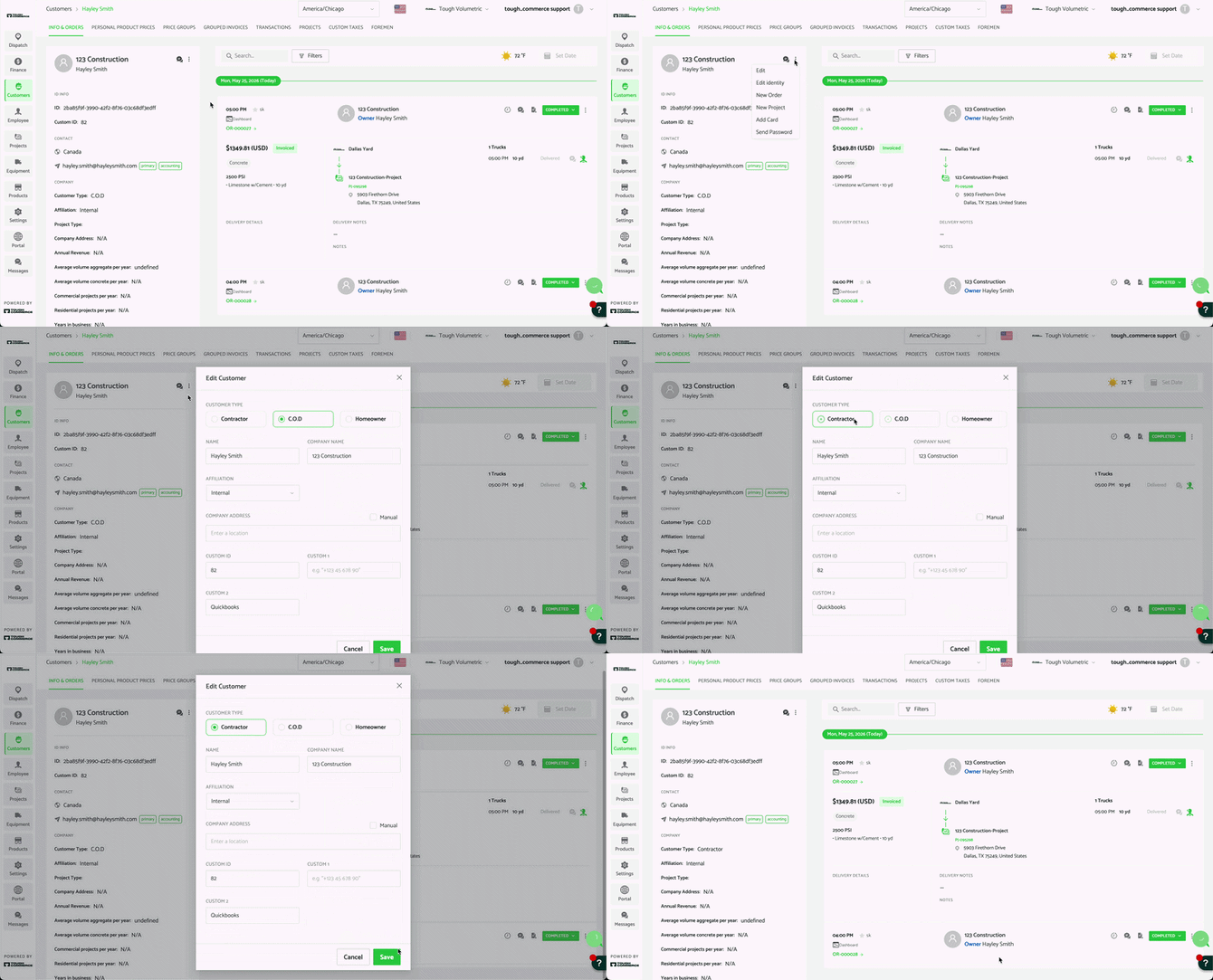
2. Editing an Existing Customer
- Click the customer name on the customer page to access the customer profile
- Select the menu icon (3 dots) in the top left
- Select Edit
- Choose the desired Customer Type
- Save your changes
Legacy Customers
The Legacy customer type preserves the original billing workflow that existed before Customer Types were introduced in Tough Commerce. It is intended for customers who require access to the full range of historical payment and billing options.
When creating orders for a Legacy customer, dispatchers can:
- Add a credit card directly to an order
- Save a card on the customer profile
- Add a payment method later during order creation
- Send payment links
- Record offline payments
- Use the On Account payment method
- Apply and redeem Credit Memos
Legacy customers provide the greatest flexibility for businesses that rely on traditional account billing workflows while continuing to support standard payment collection methods.
Note: Legacy customers are intended to maintain compatibility with the original Tough Commerce billing experience. New customer workflows may be better supported through the C.O.D. or Contractor customer types, depending on your billing requirements.
C.O.D Customers
By default, all customers will be created as a C.O.D customer. C.O.D customers use the standard payment workflow, where dispatchers can:
- Add a credit card directly to an order
- Save a card on their customer profile
- Add a payment method later during order creation
- Send payment links
- Have offline payments recorded against their orders
Important Changes to Note: The “On Account” payment method and Credit Memos are not available for C.O.D customers. If your customer requires these billing options, consider using the Legacy customer type instead or follow the steps below.
Instead, if a customer needs to pay later, you can:
Option 1: Select “Add Payment Method Later”. This allows the order to be created without immediate payment. You can then:
Track outstanding balances through:- Finance > Aging
- The customer account page
Option 2: Move the Customer to a Contractor Customer Type. This means that no payment method is required when entering an order, and you can then invoice the customer at a later time using the grouped invoice workflow. See the Contractor Customers section below for more information.
Contractor Customers
The Contractor customer type is designed for customers who require invoicing rather than immediate payment during order creation. When creating an order for a Contractor customer:
- Payment options will not appear
- “Add Payment Method Later” will not appear
- Orders must be billed through grouped invoices
To collect payment, you must first create a Grouped Invoice.
What is a Grouped Invoice?A grouped invoice allows you to combine one or more orders into a single invoice for the customer. This is commonly used for contractors who prefer to receive consolidated invoices rather than paying order-by-order.
Creating a Grouped InvoiceGrouped invoices can be created from: Finance > Orders. Once the invoice is created, customers can:
- Pay online using the QR code on the invoice
- Receive a payment link
- Have an offline payment recorded
- Use credit memos (Contractor customers only)
For full instructions on grouped invoices, see the Grouped Invoice support article.
Homeowner Customers
The Homeowner customer type currently functions the same as the C.O.D customer type. Future updates to the Homeowner customer type will include:
- Restricting customers to a single contact
- Removing support for multiple foremen/contacts under one customer profile